
Every pixel on your screen is built from three numbers. Red, green, and blue light mix together to create every color your monitor can display.
That combination is the RGB code.
When you are using tools like Figam, you do not need to understand RGB codes. But the designers who actually understand it make better decisions on the first try.
They know why colors look wrong on certain screens. Which blues will blow out in print. And instead of guessing, they control the output.
In this guide, learn what an RGB code is, the science behind it, how to read one at a glance, and where beginners lose time.
Guide content:
What Is RGB Code
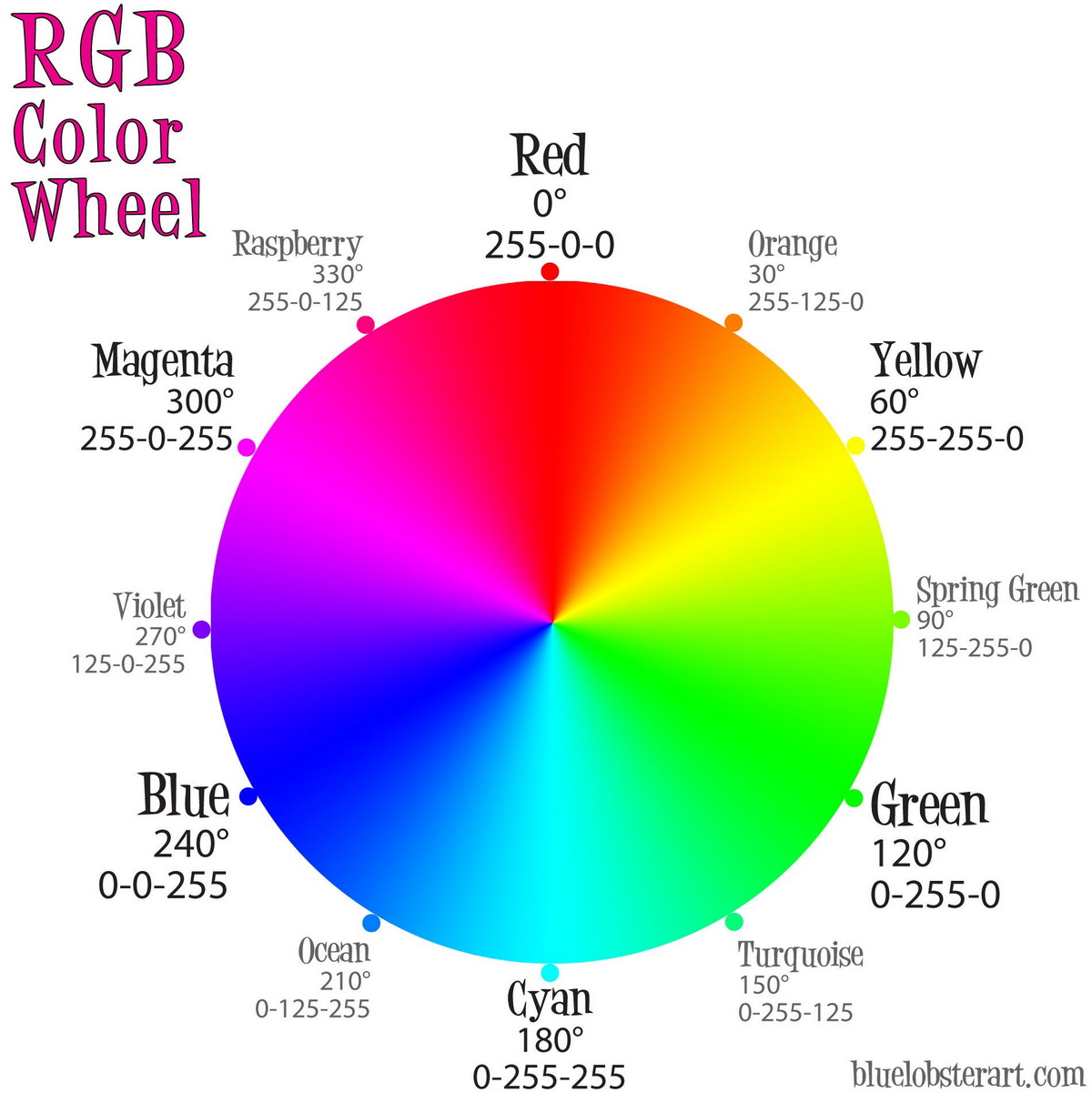
An RGB code is three numbers that describe a color using red, green, and blue light. Each number runs from 0 to 255. By combining them and you get a single, specific color.
It’s like GPS coordinates. Latitude, longitude, and altitude give you three numbers to pinpoint a location on earth. RGB does the same thing for color.
Here are few RGB color examples:
rgb(255, 0, 0): pure red with zero green and zero bluergb(0, 255, 0): pure greenrgb(0, 0, 255): pure bluergb(255, 255, 255): white with every channel at maximumrgb(0, 0, 0): black with no light at any channel
The concept that trips most beginners is this idea that RGB builds color by adding light together.
It starts at black and works upward. Paint does the opposite, since you start with a white canvas and subtract as you add pigment. If you ever mix red and green paint expecting yellow, RGB will confuse you until you internalize the difference.
RGB handles light, while paint handles pigment. Screens emit light, so RGB is their native language.
Where the RGB Model Came From
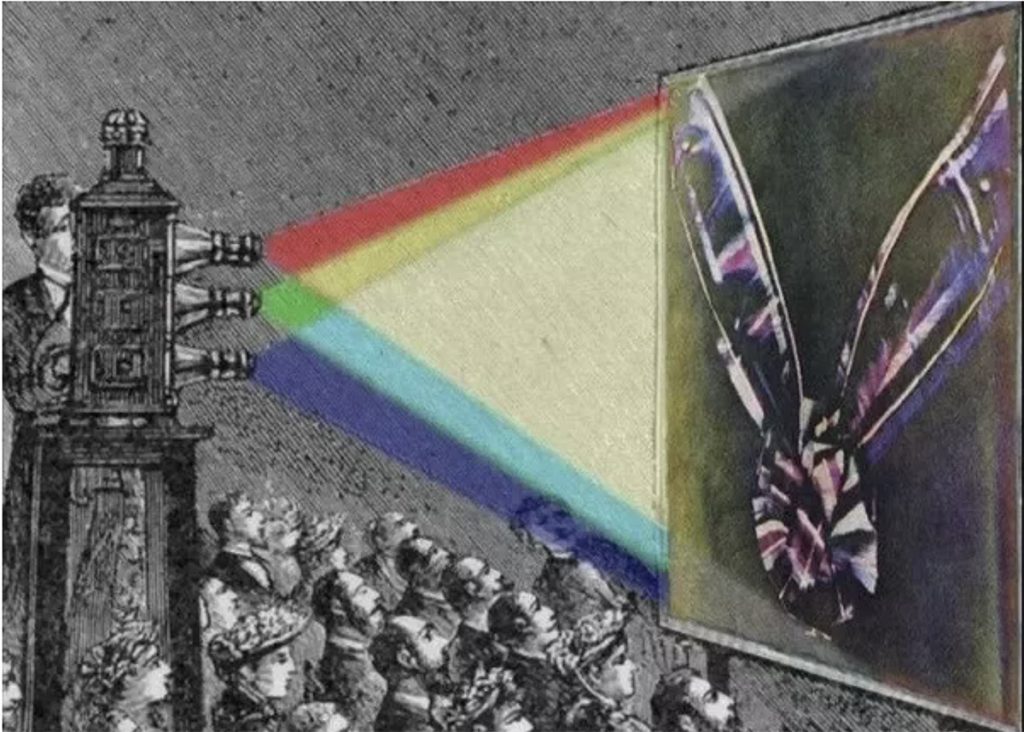
James Clerk Maxwell took the first color photograph in 1861. A Scottish physicist, he shot a tartan ribbon through three colored filters, then projected each image back through a matching filter until the ribbon colors reappeared on screen.
The photograph proved what Thomas Young and Hermann von Helmholtz had been arguing about for decades.
The human eye contains three types of cone cells, each sensitive to a different range of wavelengths across the red, green, and blue regions. Your eye was designed for RGB long before anyone built a pixel.
Television inherited this model in the mid-1900s. Every monitor, phone screen, and TV panel since follows the same principle.
Each dot contains three sub-pixels. Change the ratios and the color changes.
How Does RGB Code Work?
RGB creates color through an additive process.
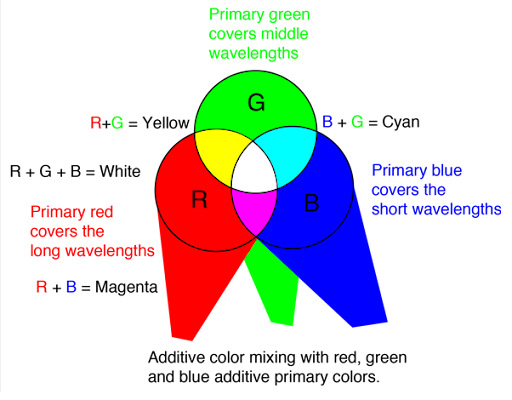
Start with a black screen, no light at all. Turn on the red sub-pixel and you see red. Add green to that mix and the result is yellow. Add blue on top and you push toward white.
Here is how the primary combinations break down:
- Red + Green = Yellow
- Green + Blue = Cyan
- Blue + Red = Magenta
- Red + Green + Blue = White
Why Red, Green, and Blue?
Your retina drives the decision, not aesthetics. Three types of cone cells inside your eye handle color perception:
- L-cones: Peak sensitivity around 560 nanometers (yellow-green range)
- M-cones: Peak around 530 nanometers (green)
- S-cones: Peak around 420 nanometers (blue-violet)
Your brain reads the relative signals from these three cone types and interprets the result as a color. RGB displays feed those cones in measured proportions, and your brain decodes the mix.
Pro tip: If a color looks wrong in RGB, check your color space before touching any values. Most “this color looks off” complaints come from the wrong gamut, not the wrong numbers.
The 0 to 255 Range
Each channel gets 256 possible values because eight bits of data produces 2⁸ combinations. Three channels at eight bits each gives you 24-bit color, commonly called TrueColor.
That works out to 16,777,216 distinct colors.
Human eyes can distinguish roughly 10 million under ideal lab conditions. So standard RGB gives you more range than perception can actually use.
Higher-end workflows push past eight bits.
For example, ten-bit RGB offers 1,024 values per channel and over a billion colors total.
You’ll find ten-bit on broadcast monitors, medical imaging equipment, and professional reference displays.
For web work though, eight bits is the standard and more than enough.
How to Read RGB Code
The format sits right in front of you: rgb(red, green, blue).
Once you know the pattern, reading any value becomes a quick mental exercise:
- The highest number sets the base hue. Red leading means some shade of red, orange, or yellow.
- The gap between channels controls saturation. Wide gaps create vivid colors, while close values drift toward gray.
- The total sum controls brightness. High values across the board mean light. Low values mean dark. Equal values mean gray.
Here are few real values put this into practice.
rgb(255, 255, 102): Red and green sit at max while blue lands at 102. Red plus green light produces yellow, and that small blue channel lifts the tone slightly toward lemon color.
rgb(128, 0, 128): Equal red and blue at half-strength with zero green. That’s a purple color, and the halved intensity makes it darker than either of the primaries.
rgb(180, 180, 185): All three channels land close together in the upper mid-range. Light gray with the barest blue excess, something most people would miss unless it sat next to a true neutral.
rgb(255, 128, 0): Maximum red, mid-range green, no blue. Saturated orange, traffic-cone territory.
Common Color Formats You Will See on the Web
rgb(72, 145, 220): standard comma notationrgba(72, 145, 220, 0.5): adds an alpha channel for translucencyrgb(72 145 220): modern space-separated CSS with optional alpha after a slashrgb(28%, 57%, 86%): percentage notation instead of 0 to 255#4891DC: hex color code for this exact color
The percentage notation catches people off guard. The percentage marks where the channel sits along its own range.
Fifty percent across every channel produces medium gray, so rgb(50%, 50%, 50%) maps to rgb(128, 128, 128).
Quick Reference: Common RGB Codes
- White color:
rgb(255, 255, 255) - Off-white, warm color:
rgb(249, 245, 240) - Pure black color:
rgb(0, 0, 0) - Soft black color:
rgb(33, 37, 41) - Red color:
rgb(255, 0, 0) - Green color:
rgb(0, 128, 0) - Blue color:
rgb(0, 0, 255) - Royal blue color:
rgb(65, 105, 225) - Yellow color:
rgb(255, 255, 0) - Orange color:
rgb(255, 165, 0) - Purple color:
rgb(128, 0, 128)
RGB Compared to Other Color Models
RGB shares the stage with HEX, HSL, CMYK, and LAB. Each model describes the same colors using different dimensions, so knowing when to reach for each one saves time.
RGB vs HEX
HEX translates the same RGB values into a different notation. Each 0-to-255 channel becomes two hexadecimal digits from 00 to FF.
| RGB | HEX |
|---|---|
rgb(255, 255, 255) | #FFFFFF |
rgb(0, 0, 0) | #000000 |
rgb(255, 0, 0) | #FF0000 |
rgb(0, 128, 128) | #008080 |
rgb(255, 165, 0) | #FFA500 |
HEX wins on compactness for HTML and CSS stylesheets. While RGB wins on readability since you can actually see which channel drives the color.
Most developers ship production code in HEX and tweak colors in RGB.
RGB vs HSL
Nobody asks for “30 less red and 15 more green.” People ask for lighter, darker, or more vivid. HSL organizes color around those natural human dimensions:
- Hue (0 to 360): Position on the color wheel. Zero is red, 120 is green, 240 is blue.
- Saturation (0% to 100%): Purity of the color, from fully gray to fully vivid.
- Lightness (0% to 100%): Brightness from black through white, with 50% in the middle.
Lighten a color in HSL by bumping the lightness slider. With RGB color code you need to raise all three channels proportionally while guessing how much.
Same visual result, but HSL gives you a much more intuitive path.
HSL handles palette work and client conversations because it maps to natural language. RGB takes over when you paste values into a stylesheet and need to ship.
RGB vs CMYK
When you design in RGB, send the file to a printer, and watch the output go flat and dull.
RGB builds color from light. CMYK builds color by laying ink on paper across cyan, magenta, yellow, and black channels. The “K” stands for “key,” the black plate that anchors contrast in four-color printing.
Make sure to convert any file to CMYK before sending it to a commercial printer.
You can do so by finding Image > Mode > CMYK Color in Photoshop.
RGB numbers don’t translate to CMYK numbers directly. Colors that blaze on screen often fall outside what four-process inks can physically reproduce.
RGB Color Spaces
The same rgb(255, 0, 0) won’t produce an identical red on every screen. The actual shade depends on the color space (or gamut) the display uses.
A color space defines the precise red, green, and blue shades that serve as the primaries, along with a white point and a gamma curve. Think of the color space as a dictionary that translates three numbers into actual light. Change the dictionary and those same numbers produce a different color.
sRGB
Hewlett-Packard and Microsoft published the standard in 1996, and it became the common language of screen color.
Most monitors approximate sRGB, browsers assume sRGB, and the entire internet operates inside this container.
The space covers roughly 35% of all visible colors. Which sounds narrow until you consider that the remaining 65% includes shades most people have never seen on a screen.
Use sRGB for: Web design, app design, social graphics, anything hitting a browser.
Adobe RGB
Adobe RGB captures approximately 50% of the visible color spectrum, pushing the remaining space into blue-greens.
Photographers usually shoot in Adobe RGB because camera sensors record more data than sRGB can hold.
When you put an Adobe RGB image on an sRGB monitor the colors oversaturate. For example, the sky turns neon because the monitor reads the values as sRGB coordinates when they were authored for a wider space.
Use Adobe RGB for: Photography, print workflows, editing on calibrated monitors.
Display P3
Apple developed Display P3 as a wider color gamut alternative. It covers approximately 45.5% more colors than sRGB and is used in current iPhones, MacBooks, iPads, and many high-end Android phones.
Design brand assets for premium devices using Display P3 to unlock richer, more saturated colors that will stand out on compatible screens.
Use Display P3 for: iOS app design, premium brand assets, HDR video, and any setup where you control the display environment.
| Color Space | Visible Color Coverage | Primary Use |
|---|---|---|
| sRGB | ~35% | Web, browsers, consumer screens |
| Adobe RGB | ~50% | Photography, print design |
| Display P3 | ~46% | iOS, HDR video, premium displays |
Working with RGB in Your Actual Tools
RGB in CSS
CSS gives you a few ways to express the same color:
Standard syntax:
.button {
  background-color: rgb(65, 105, 225);
  color: rgb(255, 255, 255);
}
Alpha transparency:
.overlay {
  background-color: rgba(0, 0, 0, 0.6);
}
Alpha runs from zero (invisible) to one (solid). It replaced the old opacity property that made every child element transparent too, which was almost never what you wanted.
Modern space-separated syntax:
.card {
  background-color: rgb(255 248 220 / 0.8);
}
Spaces replace commas and a slash separates the alpha value. Cleaner format, though you’ll want to check browser support if you’re serving legacy visitors.
Display P3 via color():
.brand-hero {
  color: rgb(239, 35, 60);
  color: color(display-p3 0.93 0.14 0.24);
}
The first line acts as the sRGB fallback. The second upgrades to Display P3 when the browser supports it, which is progressive enhancement done right.
RGB in CSS Custom Properties
Storing individual channels as separate variables unlocks a useful trick for managing opacity across your stylesheet:
:root {
  --brand-r: 65;
  --brand-g: 105;
  --brand-b: 225;
  --brand-primary: rgb(var(--brand-r), var(--brand-g), var(--brand-b));
}
Now you can adjust opacity dynamically without maintaining separate color tokens for every state.
.btn-hover {
  background-color: rgb(var(--brand-r), var(--brand-g), var(--brand-b), 0.9);
}
Final Thoughts: RGB Code
RGB comes down to three numbers combining three kinds of light into roughly 16.7 million possible colors. The system’s strength isn’t complexity, it’s universality: every browser, phone, and television you design for speaks the same language.
Here’s the short version to keep in your head:
- sRGB by default for anything going on the web
- Pick colors in HSL, ship in RGB (or HEX)
- Convert to CMYK before anything reaches a printer
- Preview on multiple screens before finalizing
- Run contrast checks every single time
- Centralize your colors in one file or library
Get these habits right and the three-number system stops feeling like a code. It starts reading like a color map.

Leave a Reply